

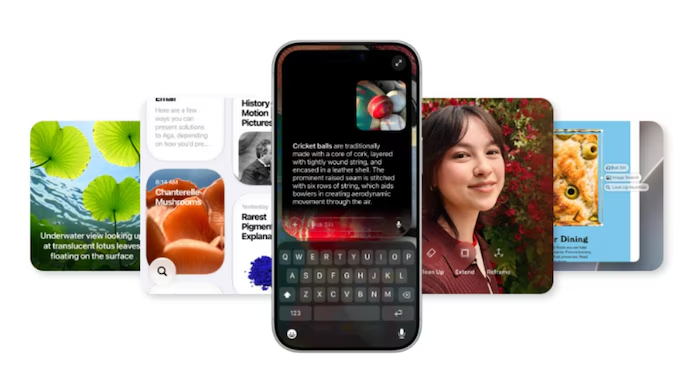
Apple has officially rolled out the iOS 27 Public Beta, giving eligible iPhone users early access to the company’s next major software update before its full public release later this year.
The biggest highlight of the update is the introduction of a redesigned Siri AI, alongside expanded Apple Intelligence features, smarter productivity tools, improved Photos editing capabilities and noticeable performance improvements across the system.
Siri AI Gets Apple’s Biggest AI Upgrade Yet
The standout feature in iOS 27 is the completely revamped Siri AI.
Apple has redesigned Siri to make conversations feel more natural, allowing users to ask follow-up questions without repeating context. The assistant can now understand ongoing conversations, retrieve information from supported apps and perform more complex tasks across the iPhone.
Siri AI can search personal information stored in apps such as Mail, Messages, Notes, Calendar and Reminders while also responding to on-screen content and carrying out actions within compatible apps.
Users can also customise how Siri speaks by adjusting voice pace and expressiveness.
However, the new AI-powered Siri is available only on devices that support Apple Intelligence, including the iPhone 15 Pro and newer compatible models.
Apple Intelligence Expands Across Apps
Beyond Siri, Apple has added several AI-powered tools throughout iOS 27.
Photos App Gets Smarter
The Photos app introduces improved AI editing features, including:
- Enhanced Clean Up tool for removing unwanted objects
- AI-powered Extend feature to expand images
- Spatial Reframing, allowing users to adjust the framing of photos after capture
These additions aim to simplify photo editing while improving image quality.
Safari Receives AI Enhancements
Safari now offers smarter browsing features, including:
- Automatic tab organisation by topic
- Smarter bookmark and Reading List management
- Website monitoring for page updates
- AI-generated browser extensions created using natural-language prompts
These tools are designed to make web browsing more organised and efficient.
Productivity Apps Receive Useful Upgrades
Several built-in Apple apps have also received intelligent improvements.
The Passwords app can now automatically replace weak or compromised passwords when supported.
The Shortcuts app allows users to create automations using simple natural-language commands.
Calendar can generate events directly from written instructions, while writing tools across iOS now include improved grammar correction alongside spelling assistance.
Faster Performance Across the System
Apple says iOS 27 also delivers meaningful performance improvements.
According to the company:
- Apps can launch up to 30% faster
- Newly captured photos appear up to 70% faster
- AirDrop transfers can be up to 80% faster
These improvements aim to make everyday tasks smoother across supported devices.
More New Features in iOS 27
The public beta also introduces several additional upgrades, including:
Liquid Glass Improvements
Apple has refined its Liquid Glass interface with a new appearance slider that lets users adjust transparency and readability.
Better Messages Experience
The Messages app can now continue sending large photos and videos in the background without interrupting other activities.
Photos Shared Albums
Shared Albums now support full-resolution image sharing along with expanded collaboration options.
Separate Alarm Volume Control
One of the most requested features finally arrives on iPhone, allowing users to adjust alarm volume independently from overall system volume.
AirPods Custom Equaliser
Compatible AirPods now include manual equaliser controls for bass, mids and treble, giving users greater control over audio playback.
Improved Screen Time
Apple has also updated parental controls and Screen Time with a redesigned dashboard and additional safety features.
Supported iPhones
The iOS 27 Public Beta is available for iPhones that support iOS 26, including:
- iPhone 11 series
- iPhone 12 series
- iPhone 13 series
- iPhone 14 series
- iPhone 15 series
- iPhone 16 series
- Later compatible models
- iPhone SE (2nd generation and newer)
The advanced Siri AI features require Apple Intelligence-compatible devices, including the iPhone 15 Pro and newer supported models.
How to Install the iOS 27 Public Beta
Users interested in testing the new software can install it by joining Apple’s Beta Software Program.
Before installing the beta, Apple recommends creating a complete backup through iCloud or a computer, as beta software may contain bugs, reduced battery life or compatibility issues with certain third-party apps.
After enrolling in the beta program using the Apple Account linked to the device, users can download the update through Settings > General > Software Update.
Apple has also released public beta versions of iPadOS 27, macOS 27 Golden Gate, and watchOS 27.
Conclusion
With the iOS 27 Public Beta, Apple is making artificial intelligence a central part of the iPhone experience. The redesigned Siri AI, expanded Apple Intelligence features, improved productivity tools and faster system performance make this one of the company’s most significant software updates in recent years. While beta users can explore these features today, the stable version is expected to arrive later this year alongside Apple’s next generation of iPhones.
FAQs
1. What is the biggest feature in the iOS 27 Public Beta?
The biggest addition is the redesigned Siri AI, which offers more natural conversations, app integration and improved Apple Intelligence capabilities.
2. Which iPhones support the iOS 27 Public Beta?
The beta is available for iPhone 11 and newer models, including newer iPhone SE devices.
3. Which devices support the new Siri AI?
Siri AI requires Apple Intelligence-compatible devices, including the iPhone 15 Pro and newer supported models.
4. Is the iOS 27 Public Beta free?
Yes. Apple offers the Public Beta free through its Beta Software Program.
5. Should users install the beta version?
Beta software may contain bugs and compatibility issues, so it is generally recommended for users comfortable testing unfinished software.
6. What AI features have been added to Photos?
Photos now includes an improved Clean Up tool, AI image expansion and Spatial Reframing.
7. Has Safari received any new features?
Yes. Safari can now organise tabs, monitor websites, manage bookmarks more intelligently and generate extensions using AI prompts.
8. Does iOS 27 improve performance?
Apple says the update offers faster app launches, quicker photo processing and improved AirDrop transfer speeds.
9. Can users adjust alarm volume separately now?
Yes. iOS 27 introduces independent alarm volume controls separate from the overall system volume.
10. When will the final version of iOS 27 be released?
Apple is expected to release the stable version of iOS 27 later this year alongside its next-generation iPhone lineup.
Leave a Reply